

ASUS Tuf Gaming VG27AQ1A 2560 x 1440 pixels Quad HD LED Computer Monitor – 27Inch
R$ 2.686,46
Produtos relacionados





Promoção ASUS Tuf Gaming VG27AQ1A 2560 x 1440 pixels Quad HD LED Computer Monitor – 27Inch




 Preço:
 R$ 899,00 - R$2.686,46
(Apartir de: Dec 14, 2025 04:34:39 UTC – Detalhes)
CLIQUE AQUI PARA PEGAR A PROMOÇÃO
O TUF Gaming VG27AQ1A é um monitor IPS WQHD (2560 x 1440) de 27 polegadas com uma taxa de atualização ultrarrápida de 170 Hz. Projetado para jogadores e outros que buscam jogabilidade imersiva, ele oferece especificações incríveis com tecnologia ELMB exclusiva da ASUS, com tempo de resposta de 1 ms e tecnologia Adaptive-Sync, para jogabilidade extremamente fluida sem rasgar e gaguejar.
Monitor de jogos IPS WQHD (2560 x 1440) de 27 polegadas com taxa de atualização ultrarrápida de 170 Hz projetado para jogadores profissionais e jogabilidade imersiva
ASUS A tecnologia Extreme Low Motion Blur (ELMB) elimina fantasmas e rasgos para visuais nítidos de jogos com altas taxas de quadros.
Compatível com G-SYNC, proporciona uma experiência de jogo perfeita e sem rasgos ao ativar VRR (taxa de atualização variável) por padrão
ASUS A tecnologia Eye Care possui tecnologias TÜV Rheinland certificadas sem cintilação e baixa luz azul para menos fadiga ocular e garante uma experiência de visualização confortável com sua inclinação ergonômica e suporte giratório
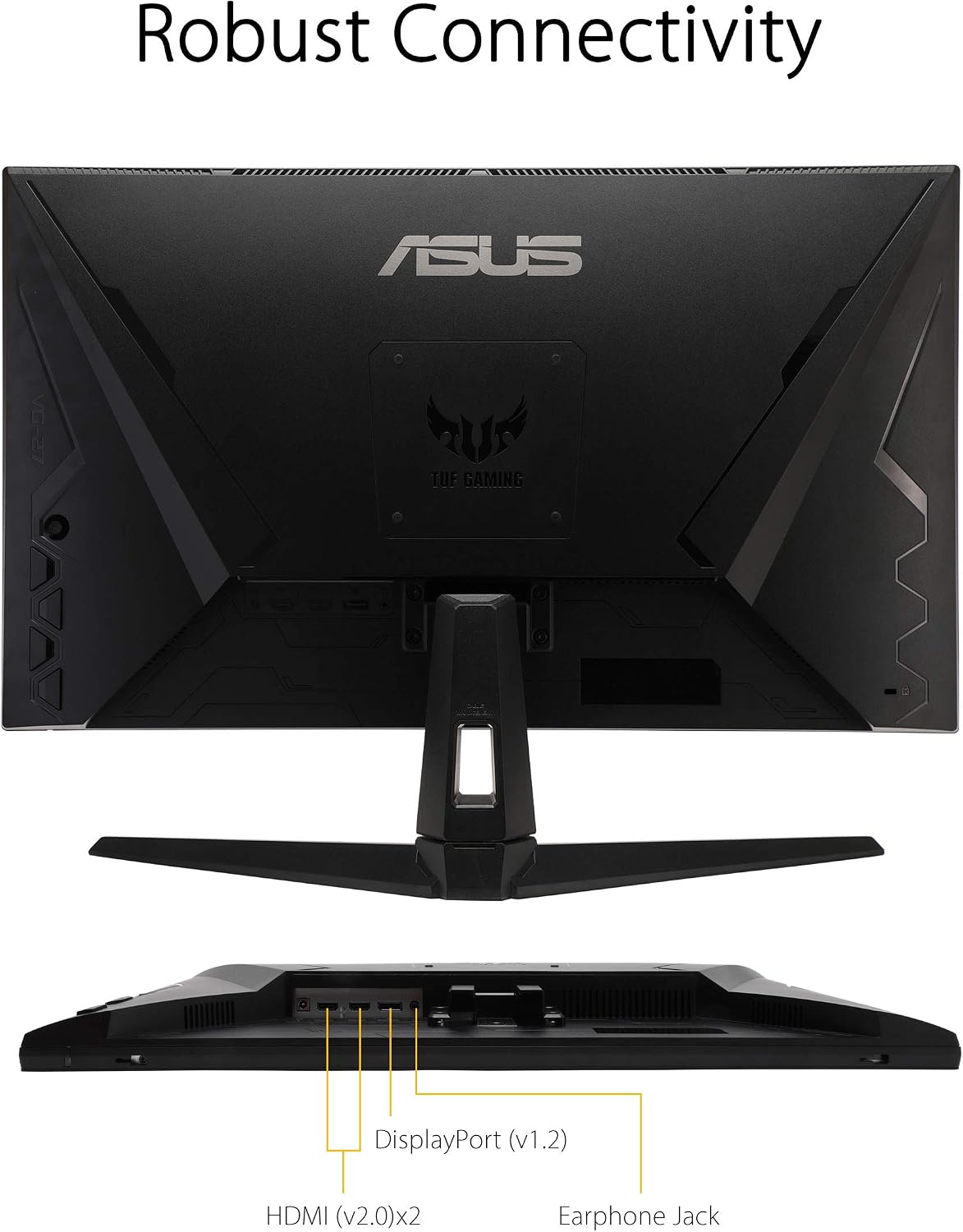
Conectividade robusta com portas HDMI (v2.0) x2, DisplayPort 1.2
O Shadow Boost melhora os detalhes da imagem em áreas escuras, iluminando cenas sem superexpor áreas brilhantes
Suporta sincronização adaptável com placas de vídeo NVIDIA GeForce* e FreeSync com placas gráficas AMD Radeon. *Compatível com NVIDIA GeForce GTX 10, série GTX 16, série RTX 20 e placas gráficas mais recentes
#ASUS #Tuf #Gaming #VG27AQ1A #pixels #Quad #LED #Computer #Monitor #27Inch
CLIQUE AQUI PARA PEGAR A PROMOÇÃO
🔎 Explore mais
- Ver mais em Computadores e Informática
- Ver mais em Monitores
- Ver mais em Monitores,Computadores e Informática
🛍️ Produtos parecidos
- OBSBOT Tiny 2 Lite 4K Webcam PC, câmera de streaming PTZ com rastreamento IA e sensor 1/2″, controle gestos HDR microfones webcam computador mesa laptop reunião videochamadas 4K@30fps / 1080@60fps
- CABO DE INTERNET CAT6 RJ45 ETHERNET LAN GIGA 10/1000 10 METROS
- Organizador de cabos, bolsa organizadora de cabos de viagem, acessórios eletrônicos, bolsa eletrônica pequena, bolsa de viagem para viagens de negócios e uso doméstico, design leve (azul marinho)
- Redragon TECLADO MECANICO MITRA K551W SINGLE COLOR SWITCH BRANCO, UNICO
- UGREEN Revodok USB C HUB 6 em 1 com 2 HDMI, Dual HDMI 4K@60Hz, Single 8K@30Hz, 5Gbps USB C, 2 USB 3.0, PD 100W, Compatível com XPS, ThinkPad, Surface e Mais (Somente macOS Suporta Modo Espelho)
- Placa WiFi 6E PCIe WiFi para PC de mesa AX7922 pro, até 5400 Mbps, Bluetooth 5.2, WPA3, adaptador sem fio 802.11AX Tri Band com MU-MIMO, compatível com Windows 10/11 (64 bits*)
- Mochila de Couro PU para Homens e Mulheres de Negócios, 15,6 polegadas, Impermeável, para Viagem, Deslocamento Diário, Leve, Mochila Escolar (Marrom)
- FONE DE OUVIDO AWS-HP-03-B BIV FONE DE OUVIDO AWS-HP-03-B
- Teclado Com Fio TCI 10 Preto Intelbras
- Notebook ASUS TUF Gaming A15, RTX 3050, AMD RYZEN 7, 16 GB, 512 GB SSD, W11 Home, Tela 15.6” FHD, Graphite Black – FA506NCR-HN088W
Especificação: ASUS Tuf Gaming VG27AQ1A 2560 x 1440 pixels Quad HD LED Computer Monitor – 27Inch
|
5 avaliações para ASUS Tuf Gaming VG27AQ1A 2560 x 1440 pixels Quad HD LED Computer Monitor – 27Inch
Adicione uma avaliação
R$ 2.686,46
Zeyad –
In terms of quality it is good, however when it comes to frame rate the website description is inaccurate. Website says that the max framerate is 170 however the actual monitor can only go up to 144.
Bu7md –
Upgrading from 60hz monitor to this was a huge difference. I like the screen the colors the build quality the equipments everything is so good.I received the package with little tears but overall it was great.I had one issue when overclocking to 170hz the monitor will start flickering every couple of minutes only while connecting 2 monitors. After a couple of research and adjustments I changed the second monitor DP cable to a thicker and stronger DP cable and it was fixed.The brightness on the monitor is more then any gamer needs especially if you play in a dark room it’s perfect.Overall it’s a great monitor and if you can buy it during sales it’s a perfect deal.
Joseph –
The monitor comes set to 60Hz. In the menu you can toggle overclocking from off to on then set the max refresh rate to 155, 160, 165 or 170, but doing so gives a warning message that overclocking may cause image stutter. I haven’t noticed any though.I find the image quality to be poor. Setting the saturation to 50 makes reds and blues look normal but makes yellows oversaturated. Setting the saturation to 35 makes yellows look normal but makes reds and blues undersaturated. The screen looks dim at 90 brightness, 100 helps but then you lose color accuracy. Having the RGB values in the 90-100 range makes medium greys look white, so I had to turn them down to 70-90. I wasn’t expecting this poor image quality from an IPS panel.Assembling the legs and attaching them to the monitor was quick and easy. I like the twist design for the base where all you need to do is put the base on, twist it into place then tighten the finger screws.If you have this as a side monitor, you need it on the right side or else you won’t be able to reach the buttons on the back. Also, it sucks that none of the buttons is an input select/switch button, you have to do that manually through the menu every time or disconnect and reconnect cables which gets tedious.I like the packaging this monitor came in. The plastic bags didn’t have to be cut open, the one with the screws is resealable, the power cable has a Velcro strap and the monitor has a thin sheet of bubble wrap taped to the front of it. Also, this monitor comes with a Phillips head Allan key in case you don’t have a screwdriver.If this is the only monitor plugged in, it takes about 5 seconds from the time you push the power button to when the image appears. If it’s a secondary monitor it takes about 9 seconds.
Jon –
Not a bad monitor and certainly has led to a sharper PC gaming experience. 2 frustrations: (1) the monitor stand is functional and although it has good tilt / pivot functionality the ability to change the screen height is limited; (2) lack of operating instructions within the box to understand how to change display settings.My first impression of the monitor wasn’t the best. The default display settings look dreadful (in my opinion) and the monitor buttons have limited functionality and ability to change these. Without operating instructions I ended up searching online for a manual (which I found) but this still didn’t help change the display settings. By chance I found an ASUS widget which I downloaded and this did the trick – enabling me to access the display settings and customise. My frustration is why didn’t ASUS include some kind of link to this really important information in the box? It could have saved me a couple of really frustrating hours and certainly hasn’t endeared me to the brand.
Shopper –
Works but it has an area of defective pixels, easy to see when the screen is black. There’s a discolouration around the area and when the screen is black it clearly shows an area of blue dots. Less blue dots visible with the naked eye but still a concerning amount