

Tobenone Estação de ancoragem USB C, monitor duplo para MacBook Pro/Air(Not M1/M2), hub USB-C com tela tripla 13 em 2, base tipo C com 2 HDMI 4K, VGA, PD3.0, 7 USB, RJ45, áudio de 3,5 mm
O preço original era: R$ 989,46.R$ 589,00O preço atual é: R$ 589,00.
Produtos relacionados


Promoção Tobenone Estação de ancoragem USB C, monitor duplo para MacBook Pro/Air(Not M1/M2), hub USB-C com tela tripla 13 em 2, base tipo C com 2 HDMI 4K, VGA, PD3.0, 7 USB, RJ45, áudio de 3,5 mm


 Preço:
 R$ 989,46 - R$589,00
(Apartir de: Dec 03, 2025 18:02:02 UTC – Detalhes)
CLIQUE AQUI PARA PEGAR A PROMOÇÃO
Descrição do produto
Compacto e poderoso USB C Macbook Pro / Air Docking Station Dual 4K Monitor
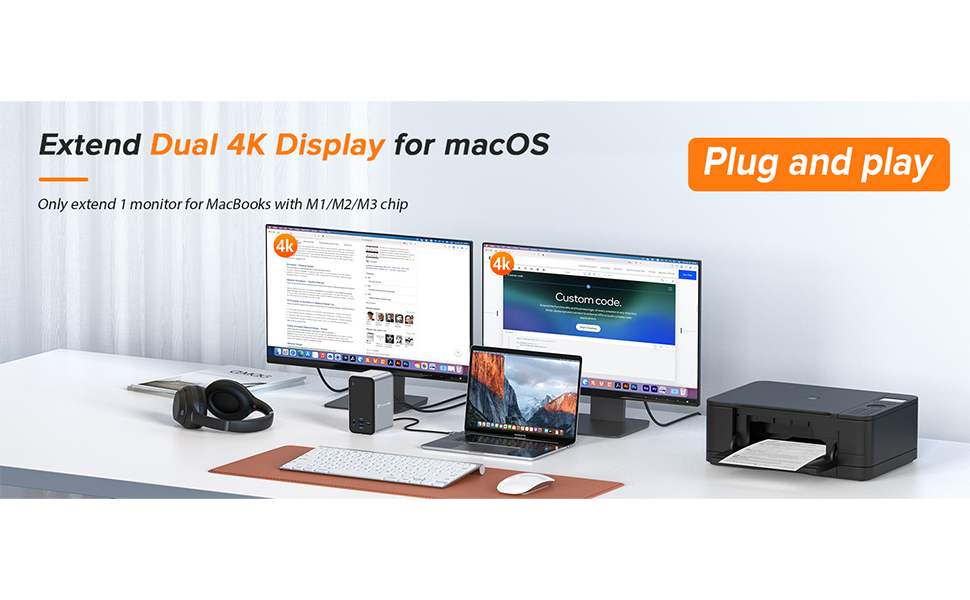
A estação de acoplamento TobenONE USB C para MacBook permite que você estenda monitores duplos 4K e conecte seus periféricos através de uma conexão de cabo único. O monitor duplo da estação de acoplamento USB C com até 13 portas de conectividade, mais recursos e mais possibilidades. Venha e vá rapidamente da sua mesa com facilidade.
Projetado para o seu MacBook
Projetado para o seu MacBook
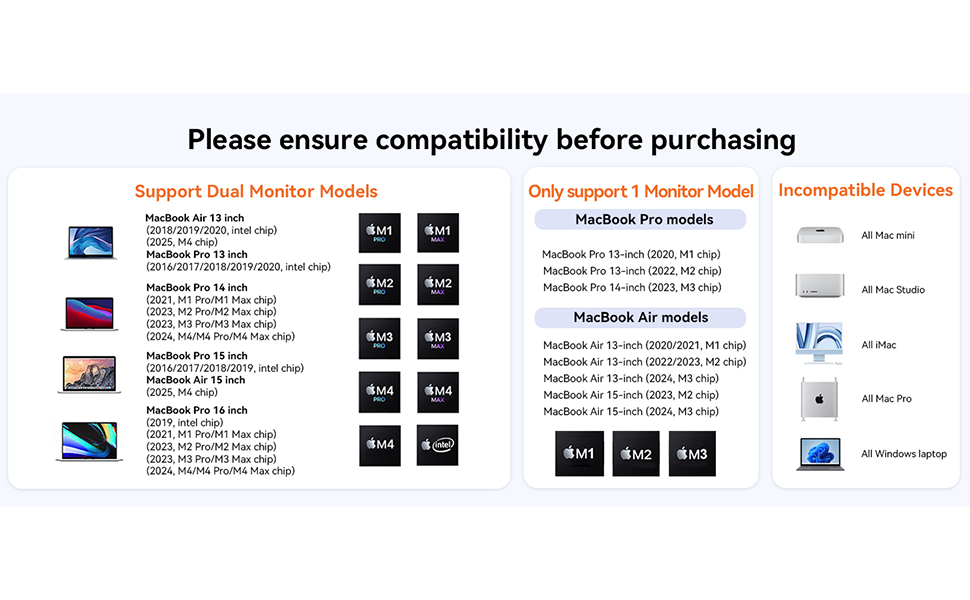
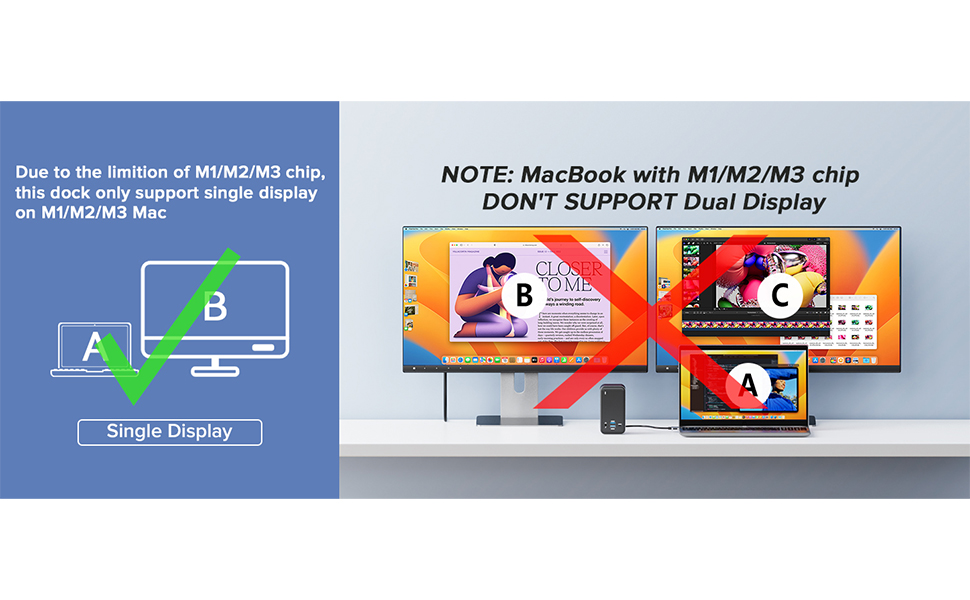
Projetado para o seu MacBook Pro:A estação de acoplamento TobenONE para MacBook pode estender monitores duplos para 2021 MacBook Pro M1 Pro/M1 Max, 2023 MacBook Pro M2 Pro/M2 Max/M3 Pro/M3 Max, 2024 MacBook Pro M4/M4 Pro/M4 Max, 2025 MacBook Air M4, 2016-2020 MacBook Pro Intel chip, 2018/2019/2020 MacBook Air Intel chip. DEVE NOTAR: 13” 2020 MacBook Pro/Air M1 chip, 13” 2021 MacBook Air M1 chip, 13” 2022 MacBook Pro/Air M2 chip, 13” 2023 M2 MacBook Air M2 chip, 14” 2023 MacBook Pro M3 chip, 15” 2023 MacBook Air M2 chip, 15” 2024 Macbook Air M3 chip só pode estender 1 monitor. Somente para MacBook, não para Windows / PC Laptop

Estação de ancoragem USB C 13 em 2: esta estação de ancoragem USB C monitor duplo para MacBook Pro combina perfeitamente todas as funções que você precisa. É equipado com 2 HDMI 4K, 1 VGA, 4 USB 3.0 e 1 USB C (até 5 Gbps), 2 USB 2.0 (para dispositivos sem fio), porta USB C PD 3.0 (suporta saída máxima de 85 W), áudio/microfone de 3,5 mm, Gigabit Ethernet e porta host dupla (conecte ao MacBook e à base de dados). Basta usar um único cabo USB C com duas saídas em cada extremidade para conectar todos os seus dispositivos para atender às suas necessidades na vida diária
Especialmente para o seu MacBook Pro: a estação de ancoragem Tobenone MacBook Pro pode estender dois monitores para MacBook Pro M1 Pro/M1 Max 2023, MacBook Pro M2 Pro/M2 Max/M3 Pro/M3 Max, MacBook Pro M4/M4 Pro/M4 Max 2024, 2016/2017/2018/2019. /2020 Chip MacBook Pro Intel, chip MacBook Air Intel 2018/2019/2020. OBSERVAÇÃO: 13 polegadas 2020 MacBook Pro/Air M1, 13” 2022 MacBook Pro/Air M2, 14” 2023 MacBook Pro M3, 15” 2023 MacBook Air M2 chip apenas pode estender 1 monitor. Não funciona para Windows
Estenda dois monitores 4K estação de ancoragem para Macbook: a estação de ancoragem USB C MacBook Pro permite que você acesse dois monitores externos 4K por meio de 2 portas HDMI, perfeita para lidar com tarefas altamente produtivas com saída de imagem e vídeo Ultra HD, como streaming de filmes, apresentações ou videogames. Os usuários do macOS podem conectar uma única tela de até 4K a 60Hz via porta HDMI, dois monitores serão 4K a 30Hz
Transferência de dados de supervelocidade: transferência de dados ultrarrápida com uma taxa de 5 Gbps para a porta USB 3.0 e porta USB-C. O adaptador MacBook Pro tem duas portas USB 2.0 especialmente projetadas para seus dispositivos sem fio, como teclado e mouse, oferecendo uma conexão Wi-Fi estável. Observação: a porta USB-C frontal suporta transferência de dados, NÃO para DisplayPort de modo alternativo
Carregamento de até 87 W com estação de ancoragem de monitor duplo: usando o chipset mais recente que suporta entrada de energia de até 100 W (PD3.0) e oferece carregamento máximo de energia de 87 W para seu MacBook USB C/Thunderbolt 5/Thunderbolt 4/Thunderbolt 3 conectado, este hub adaptador USB C para monitor duplo MacBook Pro oferece carregamento de alta velocidade para todos os telefones conectados ou outros dispositivos simultaneamente. O carregador não está incluído
#Tobenone #Estação #ancoragem #USB #monitor #duplo #para #MacBook #ProAirNot #M1M2 #hub #USBC #tela #tripla #base #tipo #HDMI #VGA #PD3.0 #USB #RJ45 #áudio
CLIQUE AQUI PARA PEGAR A PROMOÇÃO
🔎 Explore mais
- Ver mais em Acessórios
- Ver mais em Acessórios para Notebooks e Netbooks
- Ver mais em Carregadores - Bases e Docking Stations
- Ver mais em Carregadores - Bases e Docking Stations,Computadores e Informática
- Ver mais em Computadores e Informática
🛍️ Produtos parecidos
Especificação: Tobenone Estação de ancoragem USB C, monitor duplo para MacBook Pro/Air(Not M1/M2), hub USB-C com tela tripla 13 em 2, base tipo C com 2 HDMI 4K, VGA, PD3.0, 7 USB, RJ45, áudio de 3,5 mm
|
7 avaliações para Tobenone Estação de ancoragem USB C, monitor duplo para MacBook Pro/Air(Not M1/M2), hub USB-C com tela tripla 13 em 2, base tipo C com 2 HDMI 4K, VGA, PD3.0, 7 USB, RJ45, áudio de 3,5 mm
Adicione uma avaliação
O preço original era: R$ 989,46.R$ 589,00O preço atual é: R$ 589,00.
Rodrigo –
Recomendo
Exatamente como a foto. Produto bem acabado e resistente. Recomendo.
Ruberval –
Decepção.
Não tem como dar estrelas, nem meia estrela, mas para aceitarem meus comentários tenho que marcar. Portas USB não funcionam. RJ45, não funciona. Bonitinho, mas ordinário.
Amazon Customer –
Great docking station. Using for a single ultrawide monitor on a MacBook Pro. Great range of ports and looks great. Happy
MXO –
The title says it all, I have been using this dock for just under a week. I currently have M1 Max MacBook Pro 16 Inch 2021 running the latest release version at the time of this writing. The dock is smaller than I expected and well built. It feels very solid and a finish similar to my Mac.It worked immediately when I plugged it. I was most concerned about the video. At home I have a single large screen and I use a KVM. I plugged the HDMI output into my KMV and it worked perfectly from the start. Both the KVM and monitor support 4K and there were no issues. I also tried it out by connecting it directly to my monitor and use the Laptop as a second display. Again no issues here, OSX is finicky on arranging screens and no reflection on the dock. I have the same issue at work all the time. Once I have the screens arranged they stay even when the machine goes to sleep.I tested in the office with my dual screens again plug and play. No issues with resolution or performance. I will be getting one of these for the office too. The cable between the Mac and dock is excellent quality. It connects securely and will not fall out.I did not test the USB port speeds and will at some point in the future but I have not noticed any issues either in performance or support. Everything has been plug and play on the first try. I use Fusion 360 and a Space Mouse which is picky on connect and disconnect. Again here no issues, this is a critical acid test in my opinion because other devices have no handled this well.This dock does not come with a power supply. At first this concerned me until I realized its more flexible. Unlike my other more expensive dock this will work with or without power. So when I am at home I can use a dedicated power supply. However when I go on the road I just bring the dock no power brick that only works with the dock. I can use my Mac power adapter that I plug directly in to the Mac or into the dock (USB C port). If the power adapter is connected to the dock the Mac then get power via the Dock this reduces what I have to pack on business trips.Conclusions: Better functionality better flexibility and I can drive two monitors and truly plug and play. Most importantly less expensive than other docks of similar or less functionality. Highly recommended.
Jay Zhu –
This dock works perfectly for my M1 MacBook Air. I do wish that it had a DisplayPort, instead of two HDMI ports. Otherwise, it is an excellent and reliable dock.
Matt –
Works exactly as intended. I have 2 monitors hooked up to a 2022 MBPro M1 Max, + a mouse, a mini keyboard, a weird keyboard/controller hybrid, a flashdrive, and another docking station is attached TO THIS via USB 3.0, giving me even more space for ports (which i have another flashdrive and another mouse hooked into that docking station, and they work through this docking station). the only major flaw that I’ve dealt with is that for some reason the 3.5mm headphone jack did not work, i have a surround sound system with aux connect and for some reason it wouldn’t play. I have that plugged directly into the MBPro. one other minor flaw, and this does not matter for me because I don’t use SD cards or micro SD cards, but this docking station does not have an SD/Micro SD port, so if you need that, this is not the docking station for you (or maybe it is an you just need an additional SD adapter).it uses a double USB-C connection which I’ve never seen before, but it has 2 additional USB-C ports on it so you aren’t losing anything, and you still have HDMI access on your computer. This also eliminates the need for power supply because its using 1 USB-C for power, 1 for data (I think).
Amazon Customer –
na